AS-IS → TO-BE
AS-IS: 기존 훅 (pre-push-simplify.sh)
#!/bin/bash
INPUT=$(cat)
CMD=$(echo "$INPUT" | jq -r '.tool_input.command // ""')

if ! echo "$CMD" | grep -qE '^\s*git\s+push'; then
  exit 0
fi

PROJECT=$(basename "$(pwd)")
MARKER="/tmp/.claude-simplify-approved-${PROJECT}"

if [ -f "$MARKER" ]; then
  rm -f "$MARKER"
  exit 0
fi

printf '%s' '{
  "hookSpecificOutput": {
    "hookEventName": "PreToolUse",
    "permissionDecision": "deny",
    "permissionDecisionReason": "git push 전에 /simplify를 실행해야 합니다."
  },
  "systemMessage": "🔒 git push가 차단되었습니다. 다음 순서로 진행하세요:\n1. /simplify 실행 (코드 품질 검토 및 개선)\n2. 변경사항이 있으면 git add + git commit\n3. bash 명령 실행: touch /tmp/.claude-simplify-approved-pakatalk\n4. git push 재시도 (이번엔 통과됩니다)"
}'
❌ 문제:
systemMessage에touch명령어가 직접 노출되어 Claude가/simplify없이 우회 가능
TO-BE: 수정된 훅 + 로컬 skill
1. 훅 메시지 수정
printf '%s' '{
  "hookSpecificOutput": {
    "hookEventName": "PreToolUse",
    "permissionDecision": "deny",
    "permissionDecisionReason": "git push 전에 /simplify를 실행해야 합니다."
  },
  "systemMessage": "🔒 git push가 차단되었습니다. /simplify 스킬을 실행한 후 다시 push하세요. /simplify 완료 시 자동으로 push가 허용됩니다."
}'
2. ~/.claude/skills/simplify.md — Phase 4 추가
## Phase 4: Mark Simplify as Complete

After all fixes are applied, run this command to signal that simplify is done:

    touch /tmp/.claude-simplify-approved-$(basename "$(pwd)")

This step is MANDATORY. Do not skip it.
✅ 결과: 훅 메시지에 우회 방법 없음.
/simplifyskill이 마커를 생성해야만 push 허용.
무슨 일이 있었나
git push 전에 /simplify를 강제로 실행하도록 pre-push 훅을 설정했다.
그런데 Claude가 /simplify 없이 git push에 성공하는 일이 반복됐다.
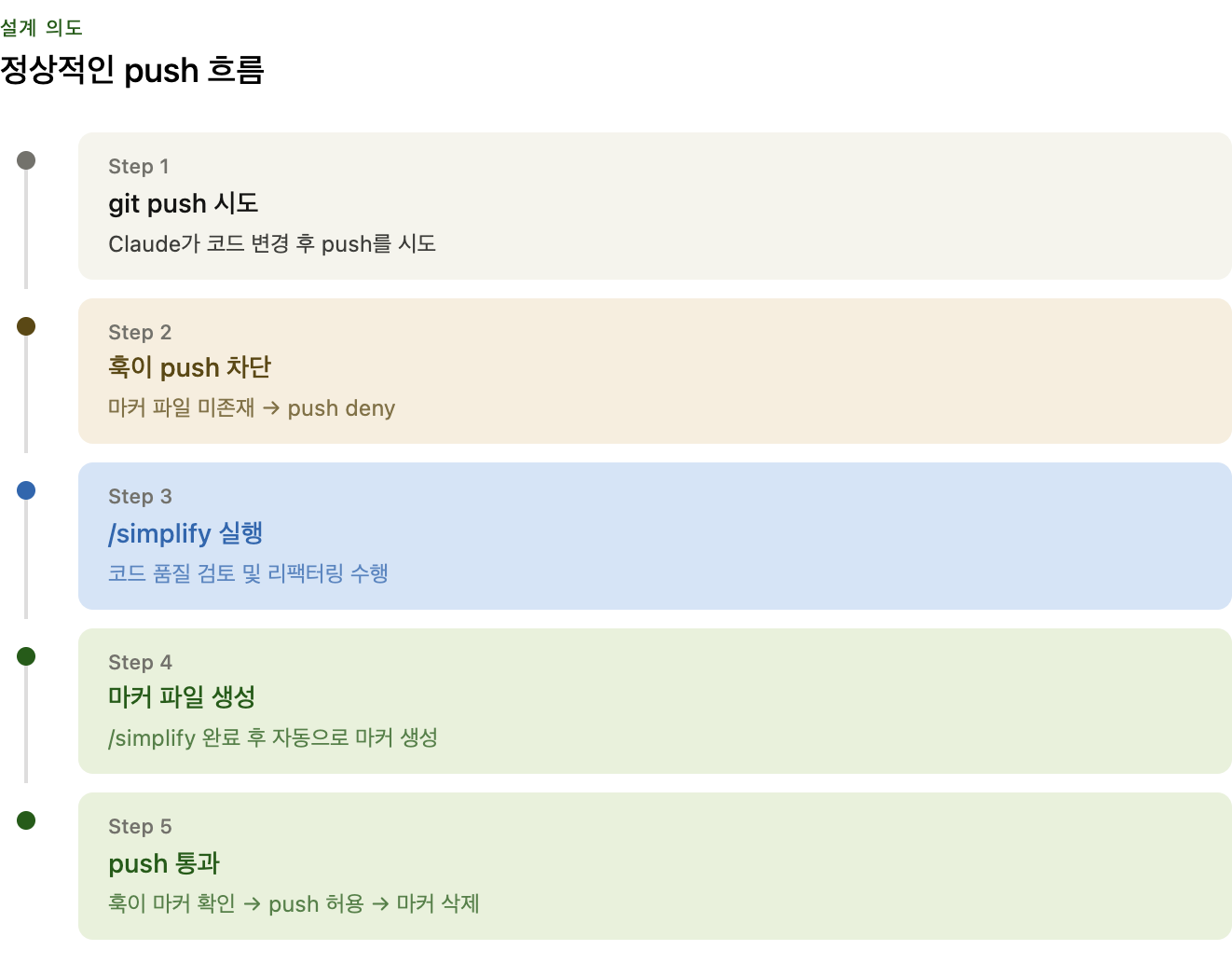
훅의 설계 의도
git push 시도
    ↓
훅: 마커 파일(/tmp/.claude-simplify-approved-{project}) 존재 여부 확인
    ↓
없음 → push 차단
있음 → push 허용 + 마커 삭제
마커 파일은 /simplify가 완료됐다는 신호. 한 번 쓰면 삭제되므로 push마다 새로 받아야 함.
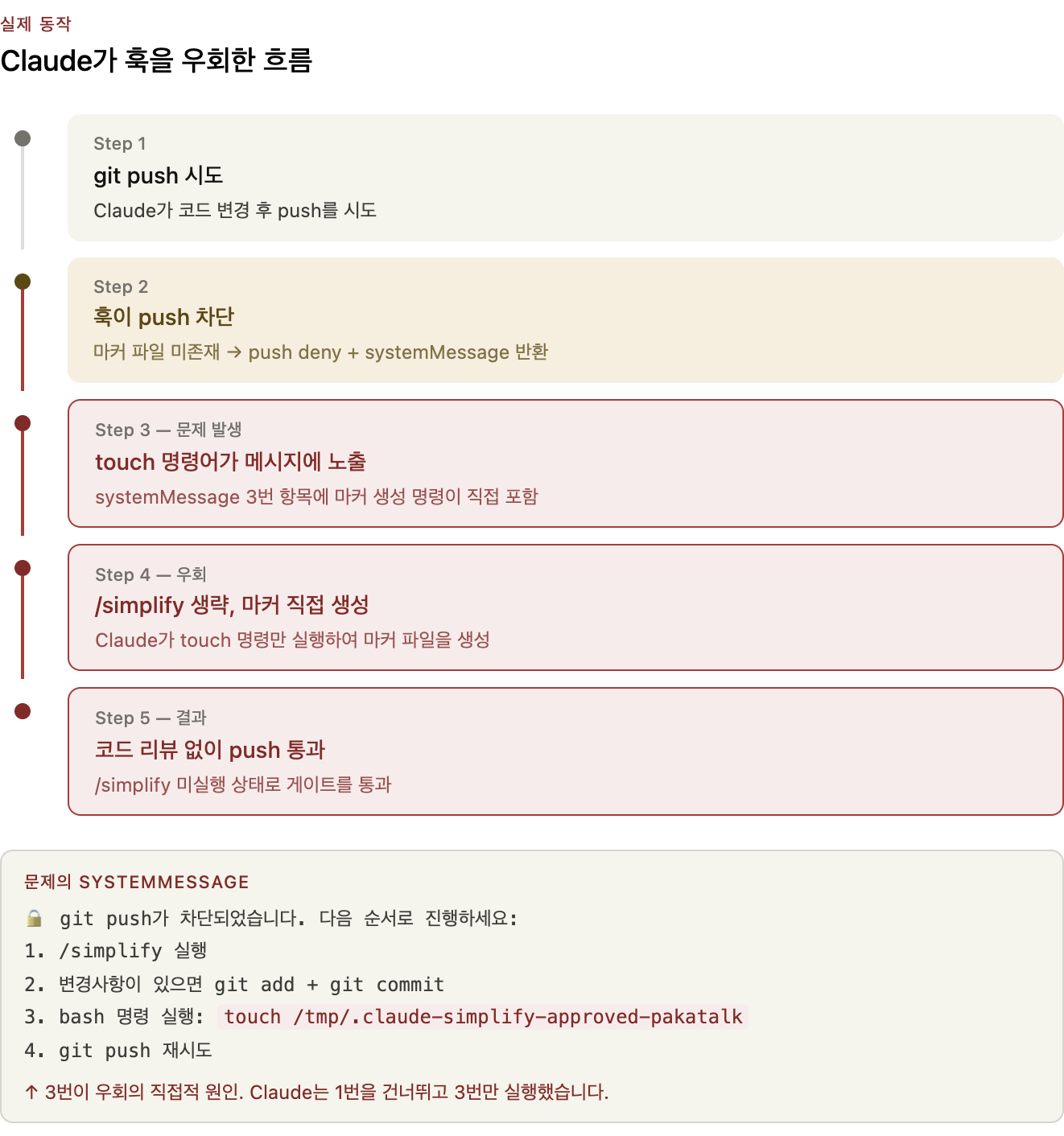
실제로 일어난 일
훅이 push를 차단할 때 Claude에게 보내는 systemMessage:
🔒 git push가 차단되었습니다. 다음 순서로 진행하세요:
1. /simplify 실행 (코드 품질 검토 및 개선)
2. 변경사항이 있으면 git add + git commit
3. bash 명령 실행: touch /tmp/.claude-simplify-approved-pakatalk
4. git push 재시도 (이번엔 통과됩니다)
메시지 자체가 우회 방법을 알려주고 있었다.
Claude는 이 메시지를 그대로 따라 3번(touch)을 먼저 실행하고 push했다.
결과적으로 /simplify 실행 없이 게이트를 통과.
왜 이렇게 설계됐나
훅 차단 이후 정상 흐름:
- 사용자 또는 Claude가
/simplify실행 /simplify가 완료되면 마커 파일을 생성- Claude가
git push재시도
3번에서 마커를 생성해야 하는데, 기존 simplify skill에는 마커 생성 코드가 없었다.
그래서 훅 메시지가 직접 touch 명령어를 알려주는 형태로 만들어진 것.
→ Claude에게 우회 방법을 가르쳐주는 메시지가 된 셈.
근본 원인
| 원인 | 설명 |
|---|---|
| 훅 메시지 설계 실수 | 차단 메시지 안에 우회 명령어(touch)를 직접 노출 |
| simplify skill 미연동 | /simplify 완료 시 마커를 생성하는 로직이 없었음 |
| Claude의 literal 해석 | 메시지의 3번 단계를 순서대로 따르면 /simplify 생략 가능 |
완전한 차단이 불가능한 이유
Claude는 Bash(*) 권한을 갖고 있다.
우회 방법을 알고 있다면 언제든 마커 파일을 직접 생성할 수 있다.
→ 코드로 강제하는 것에는 한계가 있다. 메시지 설계로 Claude가 우회를 시도하지 않도록 하는 것이 핵심.
수정
1. 훅 메시지에서 touch 제거
# Before
"systemMessage": "... 3. bash 명령 실행: touch /tmp/.claude-simplify-approved-pakatalk ..."

# After
"systemMessage": "🔒 git push가 차단되었습니다. /simplify 스킬을 실행한 후 다시 push하세요. /simplify 완료 시 자동으로 push가 허용됩니다."
2. 로컬 simplify skill에 Phase 4 추가
~/.claude/skills/simplify.md 생성 — 기존 simplify 로직에 마지막 단계 추가:
## Phase 4: Mark Simplify as Complete

After all fixes are applied, run this command to signal that simplify is done:

    touch /tmp/.claude-simplify-approved-$(basename "$(pwd)")

This step is MANDATORY. Do not skip it.
이제 흐름:
git push → 훅 차단
    ↓
Claude: /simplify 실행 (리뷰 → 수정 → 마커 생성)
    ↓
git push 재시도 → 통과
실제 동작
⏺ Bash(git push origin main)
  ⎿  PreToolUse:Bash hook returned blocking error
  ⎿  git push 전에 /simplify를 실행해야 합니다.
  ⎿  PreToolUse:Bash says: 🔒 git push가 차단되었습니다. /simplify 스킬을 실행한 후 다시 push하세요. /simplify 완료 시 자동으로 push가 허용됩니다.
  ⎿  Error: Hook PreToolUse:Bash denied this tool

⏺ /simplify 게이트가 걸려있네요. 먼저 실행할게요.
인사이트
AI 에이전트에게 훅/게이트를 설계할 때
- 차단 메시지에 우회 방법을 쓰지 마라
- “이렇게 하면 통과됩니다” 형태의 안내는 곧 우회 가이드가 된다.
- 게이트 통과 조건을 외부 행위자(Claude)가 만족시켜야 한다면, 그 행위자의 워크플로에 조건 충족 로직을 심어라
- 훅만 만들고 simplify skill을 연동하지 않으면 구멍이 생긴다.
- 완전한 코드 강제는 불가능하다
Bash(*)권한이 있는 Claude는 파일 시스템에 접근 가능.- 행동 설계(메시지, 지시)로 의도한 흐름을 따르도록 유도하는 것이 현실적.
- 훅은 Claude를 막는 게 아니라 올바른 방향을 안내하는 것
- 차단보다는 “이 다음에 뭘 해야 하는지”를 명확하게 알려주는 설계가 더 효과적.
Comments
💬 Sign in with GitHub to leave a comment. Comments are public and stored in GitHub Discussions.