#Infra #On-premises #Concept
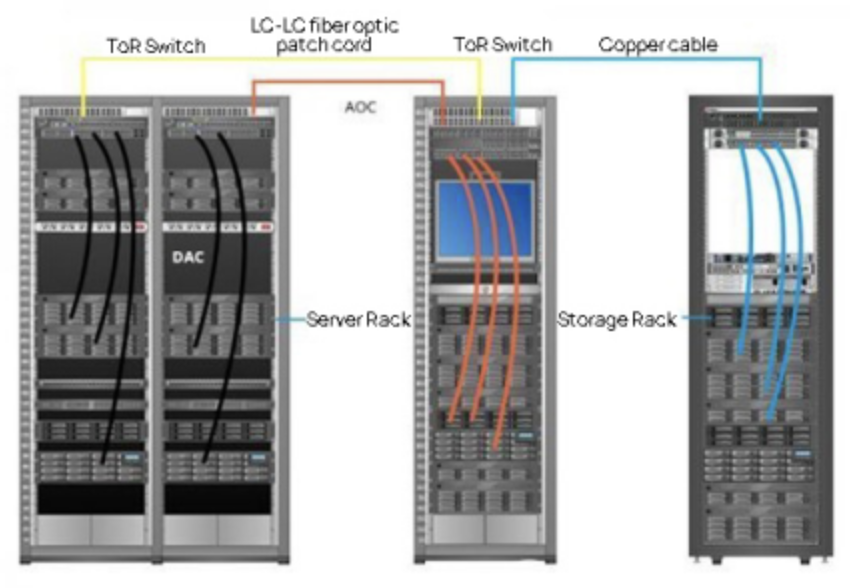
1. What Is a Rack?
In a data center, there’s a large metal shelf-like frame used to stack servers and network equipment.
That’s called a Rack.
- A single rack holds multiple servers, storage units, and network devices all lined up
- Servers like the Dell R760 and R730xd you’ve seen are all equipment that goes inside a rack
2. What Is ToR (Top of Rack)?
-
Top of Rack = the network device sitting at the very top of a rack
-
That device is a Switch
-
For the servers inside the rack to use the network, they need somewhere to plug in their cables, right?
→ Think of that plug-in point as the ToR switch
3. Why Put It at the Top?
- Easier cable management (servers only need to run cables upward)
- Easier to manage (one per rack keeps the structure simple)
- In large-scale data centers, this is the standard approach
4. A Super Simple Analogy
- You have a home router (Wi-Fi router), right? → It plays a similar role to a ToR switch
- If you have multiple computers at home, they all connect to the router to use the internet, right?
- In a data center, multiple servers plug into a ToR switch, and that ToR switch connects upstream to the broader network
5. Simple Diagram
[ 데이터센터 큰 네트워크 ]
          |
      [ ToR 스위치 ]   ← 랙 맨 위에 있음
      /   |   \
 [서버] [서버] [서버]  ← 같은 랙 안 장비들