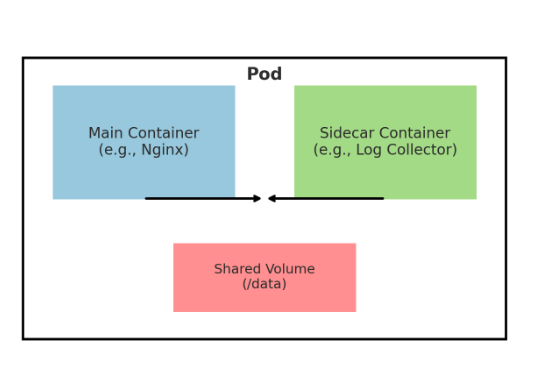
1. Starting with Pod
In Kubernetes, Pod = the unit of execution.
- Think of it as a “mini server” that bundles one or more containers (like Docker) and runs them together.
- Most Pods contain just one container → running a single app.
- But in some cases, you can put multiple containers inside a single Pod.
This is because containers within a Pod:
- Share the same IP/port space → they can communicate with each other via
localhost. - Share the same storage volumes → they can exchange files.
2. Main Container vs. Helper Container
- A Pod typically has one primary app — for example, an Nginx web server.
- But sometimes Nginx alone isn’t enough — maybe you want to collect logs separately, or automatically refresh config files.
- In cases like these, it’s useful to put a helper container inside the same Pod.
3. What “Sidecar” Means
- The term comes from the passenger seat attached to the side of a motorcycle (a sidecar).
- In Kubernetes, a sidecar container = a container that assists the main container.
- It doesn’t operate on its own — it works attached alongside the main app.
4. A Simple Example
- Main container: Nginx (serving web pages)
- Sidecar container: A small Alpine Linux container → continuously reads ConfigMap values and writes them to the
index.htmlfile. - Both use a shared volume.
Here’s how it flows:
- The sidecar writes a ConfigMap value (e.g., “color is red”) to
/pod-data/index.html. - Nginx serves that file directly at
/usr/share/nginx/html/index.html. - When the ConfigMap changes, the sidecar rewrites the file, and Nginx serves the latest value.
5. Common Real-World Sidecar Use Cases
- Log collector: A Fluentd sidecar aggregates app log files and ships them to a log server.
- Proxy: An Envoy/Istio sidecar is attached in front of the app for security and traffic control.
- Sync agent: Periodically pulls content from a Git repository and keeps it available for the app to consume immediately.