#Infra #On-premises #Concepts
1. What is SAN?
- SAN (Storage Area Network) = a dedicated storage network
- Connects servers (compute equipment) and storage (disk equipment) over a separate network, allowing servers to use storage as if it were a local disk.
-
If a regular LAN handles “user ↔ server ↔ internet communication,”
think of SAN as a dedicated network for “server ↔ storage communication.”
-
2. What is a SAN Switch?
- To build a SAN, you need a network device between the server and storage.
- That device is called a SAN switch.
- Unlike regular LAN switches, it uses storage-specific protocols such as Fibre Channel (FC).
👉 Key characteristics
- Connects servers and storage at high speed and with high reliability
- Typically supports ultra-fast ports such as 8Gb, 16Gb, and 32Gb FC ports
- Can connect multiple servers and multiple storage systems in a Fabric topology
3. Comparison: LAN Switch vs. SAN Switch
| Category | LAN Switch (Cisco, Juniper, etc.) | SAN Switch (Brocade, Cisco MDS, etc.) |
|---|---|---|
| Purpose | Server/PC ↔ Network ↔ Internet | Server ↔ Storage dedicated network |
| Protocol | Ethernet (TCP/IP) | Fibre Channel (FC) |
| Speed | 1G, 10G, 25G, 100G | 8G, 16G, 32G FC |
| Examples | Cisco Catalyst, Nexus | Brocade DS-7720B |
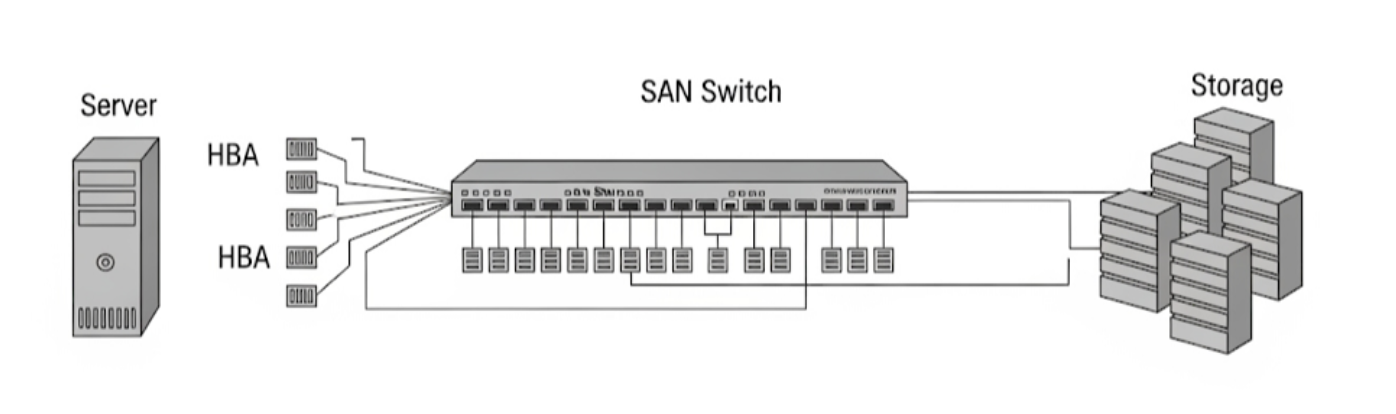
4. Network Architecture Diagram
[ 서버 (R760, R730XD 등) ]
         |
         |  (Fibre Channel)
   [ SAN Switch (DS-7720B) ]
         |
         |  (Fibre Channel)
[ PowerStore 1200T 스토리지 ]