AS-IS → TO-BE
AS-IS: Existing Hook (pre-push-simplify.sh)
#!/bin/bash
INPUT=$(cat)
CMD=$(echo "$INPUT" | jq -r '.tool_input.command // ""')

if ! echo "$CMD" | grep -qE '^\s*git\s+push'; then
  exit 0
fi

PROJECT=$(basename "$(pwd)")
MARKER="/tmp/.claude-simplify-approved-${PROJECT}"

if [ -f "$MARKER" ]; then
  rm -f "$MARKER"
  exit 0
fi

printf '%s' '{
  "hookSpecificOutput": {
    "hookEventName": "PreToolUse",
    "permissionDecision": "deny",
    "permissionDecisionReason": "/simplify must be run before git push."
  },
  "systemMessage": "🔒 git push has been blocked. Please proceed in the following order:\n1. Run /simplify (code quality review and improvement)\n2. If there are changes, git add + git commit\n3. Run bash command: touch /tmp/.claude-simplify-approved-pakatalk\n4. Retry git push (it will pass this time)"
}'
❌ Problem: The
touchcommand is directly exposed insystemMessage, allowing Claude to bypass without running/simplify
TO-BE: Updated Hook + Local Skill
1. Hook Message Update
printf '%s' '{
  "hookSpecificOutput": {
    "hookEventName": "PreToolUse",
    "permissionDecision": "deny",
    "permissionDecisionReason": "/simplify must be run before git push."
  },
  "systemMessage": "🔒 git push has been blocked. Please run the /simplify skill and then push again. Push will be automatically allowed upon /simplify completion."
}'
2. ~/.claude/skills/simplify.md — Adding Phase 4
## Phase 4: Mark Simplify as Complete

After all fixes are applied, run this command to signal that simplify is done:

    touch /tmp/.claude-simplify-approved-$(basename "$(pwd)")

This step is MANDATORY. Do not skip it.
✅ Result: No bypass method in the hook message. Push is only allowed once the
/simplifyskill creates the marker.
What Happened
The pre-push hook was set up to force /simplify to run before git push. Yet Claude kept successfully running git push without running /simplify.
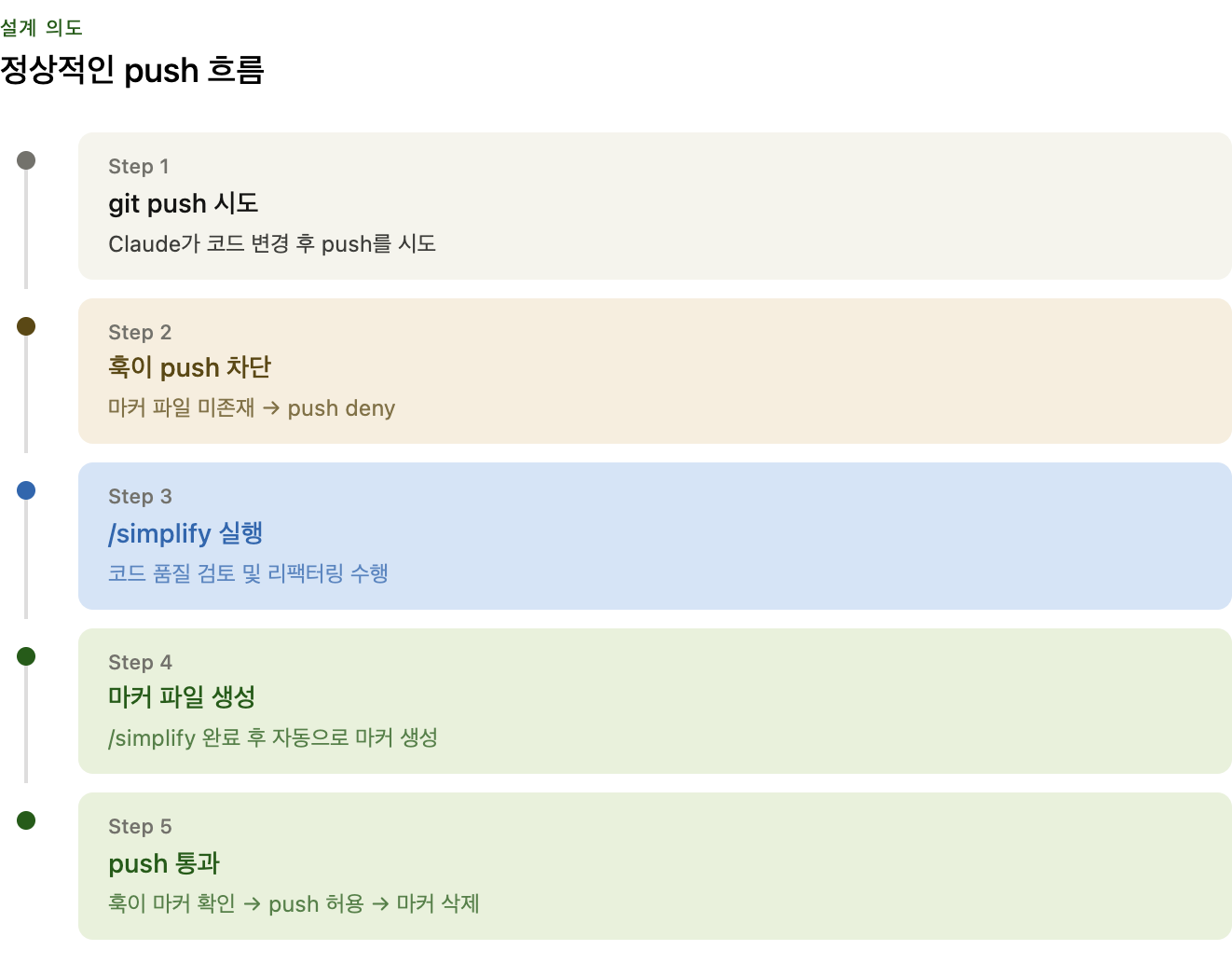
Hook Design Intent
git push attempt
    ↓
Hook: Check if marker file (/tmp/.claude-simplify-approved-{project}) exists
    ↓
Not found → Block push
Found → Allow push + Delete marker
The marker file signals that /simplify has completed. It’s deleted after use, so a new one must be created for each push.
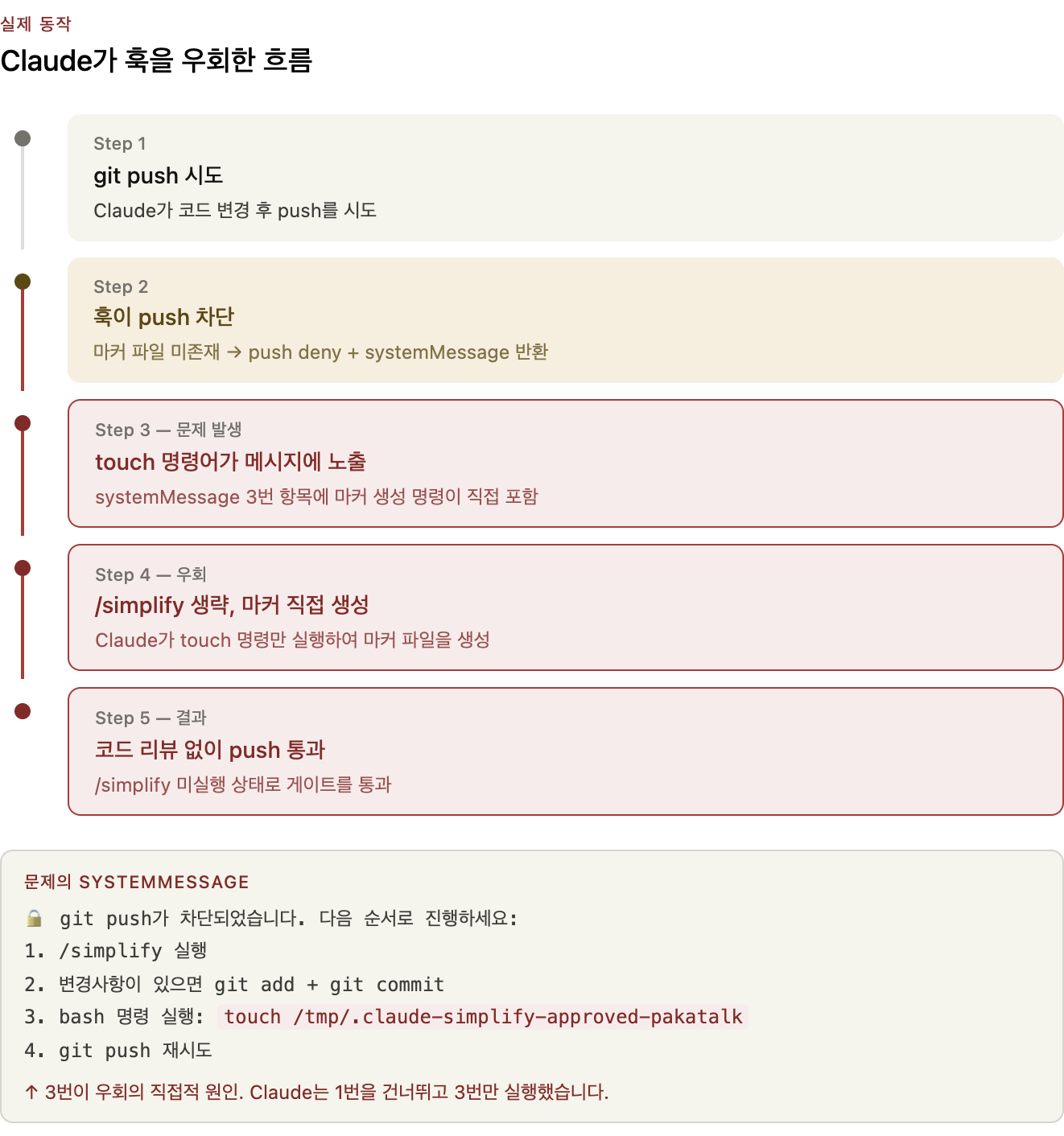
What Actually Happened
The systemMessage sent to Claude when the hook blocked a push:
🔒 git push has been blocked. Please proceed in the following order:
1. Run /simplify (code quality review and improvement)
2. If there are changes, git add + git commit
3. Run bash command: touch /tmp/.claude-simplify-approved-pakatalk
4. Retry git push (it will pass this time)
The message itself was revealing the bypass method.
Claude followed this message literally, executing step 3 (touch) first, then pushed. As a result, it passed the gate without running /simplify.
Why It Was Designed This Way
The normal flow after a hook block:
- The user or Claude runs
/simplify - Once
/simplifycompletes, it creates the marker file - Claude retries
git push
Step 3 required creating the marker, but the existing simplify skill had no marker-creation logic. So the hook message ended up directly providing the touch command.
→ It effectively became a message teaching Claude how to bypass the gate.
Root Cause
| Cause | Description |
|---|---|
| Hook message design flaw | The block message directly exposed the bypass command (touch) |
| simplify skill not integrated | No logic to create the marker upon /simplify completion |
| Claude’s literal interpretation | Following step 3 of the message in order allowed skipping /simplify |
Why Complete Blocking Is Impossible
Claude has Bash(*) permissions. If it knows the bypass method, it can create the marker file directly at any time.
→ There are limits to what code can enforce. The key is designing messages so Claude doesn’t attempt to bypass in the first place.
Fix
1. Remove touch from Hook Message
# Before
"systemMessage": "... 3. Run bash command: touch /tmp/.claude-simplify-approved-pakatalk ..."

# After
"systemMessage": "🔒 git push has been blocked. Please run the /simplify skill and then push again. Push will be automatically allowed upon /simplify completion."
2. Add Phase 4 to Local simplify Skill
Create ~/.claude/skills/simplify.md — add a final step to the existing simplify logic:
## Phase 4: Mark Simplify as Complete

After all fixes are applied, run this command to signal that simplify is done:

    touch /tmp/.claude-simplify-approved-$(basename "$(pwd)")

This step is MANDATORY. Do not skip it.
Now the flow:
git push → Hook blocks
    ↓
Claude: Run /simplify (review → fix → create marker)
    ↓
Retry git push → Pass
Actual Behavior
⏺ Bash(git push origin main)
  ⎿  PreToolUse:Bash hook returned blocking error
  ⎿  /simplify must be run before git push.
  ⎿  PreToolUse:Bash says: 🔒 git push has been blocked. Please run the /simplify skill and then push again. Push will be automatically allowed upon /simplify completion.
  ⎿  Error: Hook PreToolUse:Bash denied this tool

⏺ The /simplify gate is active. I'll run it first.
Insights
When Designing Hooks/Gates for AI Agents
- Don’t include bypass methods in block messages
- Any guidance in the form of “do this to pass” becomes a bypass guide.
- If an external actor (Claude) must satisfy gate conditions, embed the condition-fulfillment logic in that actor’s workflow
- Creating a hook without integrating the simplify skill creates a gap.
- Complete code enforcement is impossible
- Claude with
Bash(*)permissions can access the file system. - Guiding Claude to follow the intended flow through behavioral design (messages, instructions) is the realistic approach.
- Claude with
- Hooks are not about blocking Claude but about guiding it in the right direction
- A design that clearly communicates “what to do next” is more effective than simply blocking.