Concept Map - Core Keyword Connections
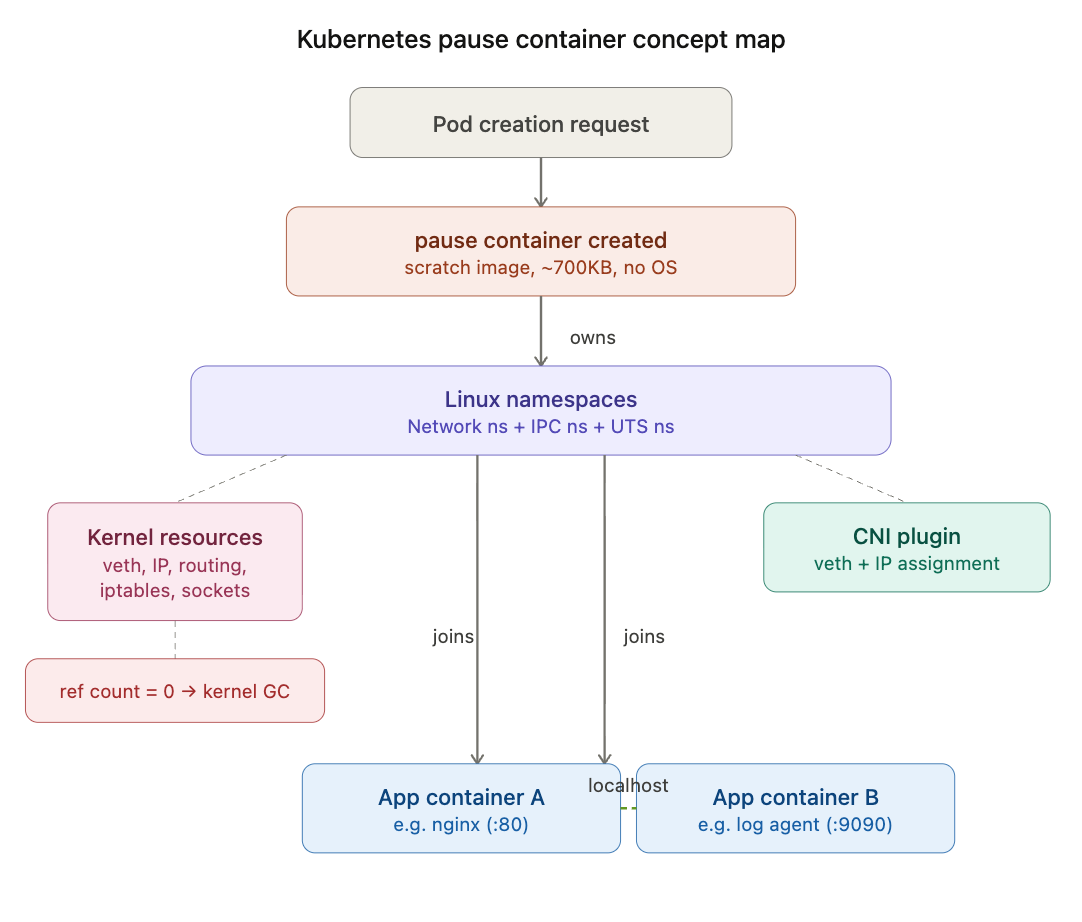
1. What is an Infrastructure Container (pause container)?
Definition
- A hidden container automatically created for every Pod
- Performs only infinite waiting via the
pause()system call — no application logic - Acts as the owner (anchor) of the Linux Namespace shared by containers within the Pod
Why is it necessary? (Cause and Effect)
Problem: App container owns the Namespace (no pause)
    │
    ├──▶ Coupled responsibilities: one container handles both app logic + infrastructure
    │       └──▶ App instability = Infrastructure instability
    │
    ├──▶ No restart isolation: owner crashes → Namespace destroyed → other containers lose network
    │       └──▶ Cannot recover individual containers via restartPolicy
    │
    └──▶ Asymmetric structure: one app container becomes "special"
            └──▶ Violates the principle of container equality within a Pod

Solution: pause container = Separation of Concerns
    └──▶ Dedicated to infrastructure role; practically no reason to crash
2. What exactly is the pause container?
| Item | Details |
|---|---|
| Source code | Written in C; core logic is ~20 lines |
| What it does | ① Registers SIGCHLD handler (zombie process reaping) ② pause() system call (infinite wait) |
| Base image | scratch (completely empty image — no shell, no libc) |
| Image size | ~700KB |
| Compilation | Statically compiled (static linking) → no OS dependencies |
| OS | ❌ No OS. Only a single binary sitting on top of the kernel |
Image Size Comparison
pause:3.9    ████ ~700KB        (scratch)
alpine       ████████████████████████████ ~7MB   (musl + busybox)
ubuntu       ████████████████████████████████████████████████████ ~78MB (full OS)
nginx        ██████████████████████████████████████████████████████████████████ ~140MB (debian)
3. Namespace Sharing Structure Inside a Pod
Shared Namespaces (owned by pause)
| Namespace | Effect |
|---|---|
| Network | All containers share the same IP; communicate via localhost |
| IPC | IPC communication possible via shared memory, semaphores, etc. |
| UTS | Shared hostname |
Isolated Namespaces (unique per container)
| Namespace | Effect |
|---|---|
| PID | Each container sees only its own processes (independent PID 1) |
| Mount | Each container has an independent filesystem view |
Patterns enabled by this structure
- Sidecar pattern: App container serves on
:80→ log agent accesses it vialocalhost:80 - Ambassador pattern: Proxy container handles external communication
- Adapter pattern: Container transforms monitoring data formats
4. Container Count
kubectl vs. Reality (example: Pod with 2 app containers)
| Method | Visible count | Actual composition |
|---|---|---|
kubectl get pods (READY column) | 2/2 | Only App A + App B shown |
crictl ps (directly on node) | 3 | pause + App A + App B |
The pause container is an infrastructure container created internally by kubelet and is therefore not visible at the Kubernetes API level.
Verification Commands
# For containerd-based setups (RKE2, EKS, etc.)
crictl ps | grep <pod-name>

# Output: all 3 containers — pause, app-container-a, app-container-b
5. How the Container Count Changes When initContainers Are Included
initContainers terminate after execution completes → the count varies depending on the point in time
Example: 1 init container + 2 app containers
Containers running at each phase:

[Initializing]  pause + initContainer = 2
                │
                ▼ init succeeds (exit 0) → init terminates/removed
                │
[App starting]  pause + app-A + app-B = 3
                │
[Running]       pause + app-A + app-B = 3
kubectl display
# During initialization
NAME        READY   STATUS
my-pod      0/2     Init:0/1     ← shows init progress

# Running state
NAME        READY   STATUS
my-pod      2/2     Running      ← init not counted
Key Rules
- initContainers run sequentially (one at a time if there are multiple)
- If any one fails, app containers will never start →
Init:CrashLoopBackOff - After all inits succeed, app containers start simultaneously
6. The Fundamental Reason pause Cannot Be Omitted
Answering: “Why not just store network info in etcd/ConfigMap?”
A Namespace is not data — it is a kernel resource.
| etcd/ConfigMap | Network Namespace | |
|---|---|---|
| Nature | Data (configuration values) | Kernel runtime resource |
| Storage | Disk/in-memory DB | Kernel memory |
| Persistence condition | Persists as long as etcd is alive | Must be held by a process to persist |
| Analogy | Phone number written in a directory | An actual phone that is connected |
Linux Namespace Survival Condition
Reference count based:

Processes referencing it ≥ 1  →  Namespace remains
Processes referencing it = 0  →  Kernel immediately releases it (GC)
Kernel Objects That Exist Inside a Network Namespace
eth0virtual interface +vethpair- IP address binding
- Routing table
- iptables/nftables rules
- Open sockets (TCP connection state)
All of these are kernel objects — they cannot be stored as key-value pairs.
Even if etcd records “IP is 10.244.1.5”, without a Namespace in the kernel, packets cannot be received.
The Essence of the pause Container
- Its purpose is not “interaction” — it is existence itself
- Infinite wait via
pause()system call → uses almost no CPU/memory - Maintains a reference to the kernel: “I’m still using this Namespace”
7. What Happens If the pause Container Dies?
pause dies
    │
    ▼
Network/IPC Namespace owned by pause is destroyed
    │
    ▼
All app containers in the Pod lose network connectivity
    │
    ▼
kubelet detects this
    │
    ▼
Entire Pod terminated → new Pod recreated (new pause + new app containers)
    │
    ▼
⚠️ New Pod receives a new IP → why Services are necessary
App container crash → only that container can be restarted via
restartPolicy
pause container crash → Namespace itself is destroyed; partial recovery impossible → entire Pod recreated
Practical Troubleshooting Tips
1. Checking the pause container when a Pod keeps restarting
# After accessing the node
crictl ps -a | grep <pod-name>
# Check pause container status — if Exited, it's an infrastructure-level issue

crictl logs <pause-container-id>
# Usually no logs (normal); errors indicate a node-level issue
2. pause image missing in air-gapped environments
# Default RKE2 pause image path
# registry.k8s.io/pause:3.9 → needs to be mirrored to Harbor

# For RKE2, configure mirror in /etc/rancher/rke2/registries.yaml
mirrors:
  "registry.k8s.io":
    endpoint:
      - "https://harbor.internal.company.com"

# Or change sandbox_image in containerd config
# /etc/containerd/config.toml
[plugins."io.containerd.grpc.v1.cri"]
  sandbox_image = "harbor.internal.company.com/pause:3.9"
3. Pod won’t start due to initContainer failure
# Check init status
kubectl describe pod <pod-name> | grep -A 20 "Init Containers"

# Check init container logs
kubectl logs <pod-name> -c <init-container-name>

# Common causes
# - Air-gapped env: init images must also be pushed to Harbor
# - DB migration failure: DB connectivity issue
# - Missing ConfigMap/Secret mount
4. Directly inspecting the Namespace when Pod networking is abnormal
# Check the Pod's network namespace
POD_ID=$(crictl pods --name <pod-name> -q)
PID=$(crictl inspectp $POD_ID | jq '.info.pid')

# Check network interfaces in that namespace
nsenter -t $PID -n ip addr
nsenter -t $PID -n ip route
nsenter -t $PID -n ss -tlnp
Expected Interview Questions
Q1. What is the role of the pause container in Kubernetes?
Key answer points:
- Owner of the Linux Namespaces (Network, IPC, UTS) shared by containers within a Pod
- Separation of concerns: decouples the infrastructure role from app containers
- Based on the scratch image, ~700KB, infinitely waits via the
pause()system call - Not visible in kubectl, but can be confirmed with crictl
Q2. How do containers within a Pod communicate with each other?
Key answer points:
- Share the same Network Namespace → same IP, communicate via localhost
- pause container owns the Namespace; app containers join it
- PID and Mount Namespaces are isolated → processes and filesystems are separated
- This structure is the foundation of the sidecar pattern
Q3. What happens if the pause container dies?
Key answer points:
- Namespace is destroyed → all app containers lose network connectivity
- kubelet recreates the entire Pod (partial recovery is impossible)
- New Pod receives a new IP → connects to the need for Service abstraction
Q4. Why is storing network information in etcd alone insufficient?
Key answer points:
- A Namespace is not data — it is a kernel runtime resource
- Reference count based: it only exists as long as a process holds a reference
- etcd = desired state (control plane), Namespace = actual state (data plane)
- The pause container is the anchor of actual state
Q5. What is the difference between an initContainer and a regular container?
Key answer points:
- init runs sequentially then terminates; app containers start simultaneously and remain running
- App containers do not start if an init container fails
- init containers are not included in the kubectl READY count
- Use cases: DB migrations, config file downloads, waiting for dependent services
One-Line Summary
The pause container is the most important “process that does nothing” — it does nothing, yet makes the Pod’s network exist.
Related Learning Keywords
CNI (Container Network Interface)→ the process of plugging a veth pair into the Namespace created by pauseService / kube-proxy→ abstraction that ensures stable access even when Pod IPs changeCRI (Container Runtime Interface)→ the interface through which kubelet creates the pause containerLinux cgroup→ the other pillar of container isolation, alongside NamespaceSidecar Container (K8s 1.28+)→ init container withrestartPolicy: Always