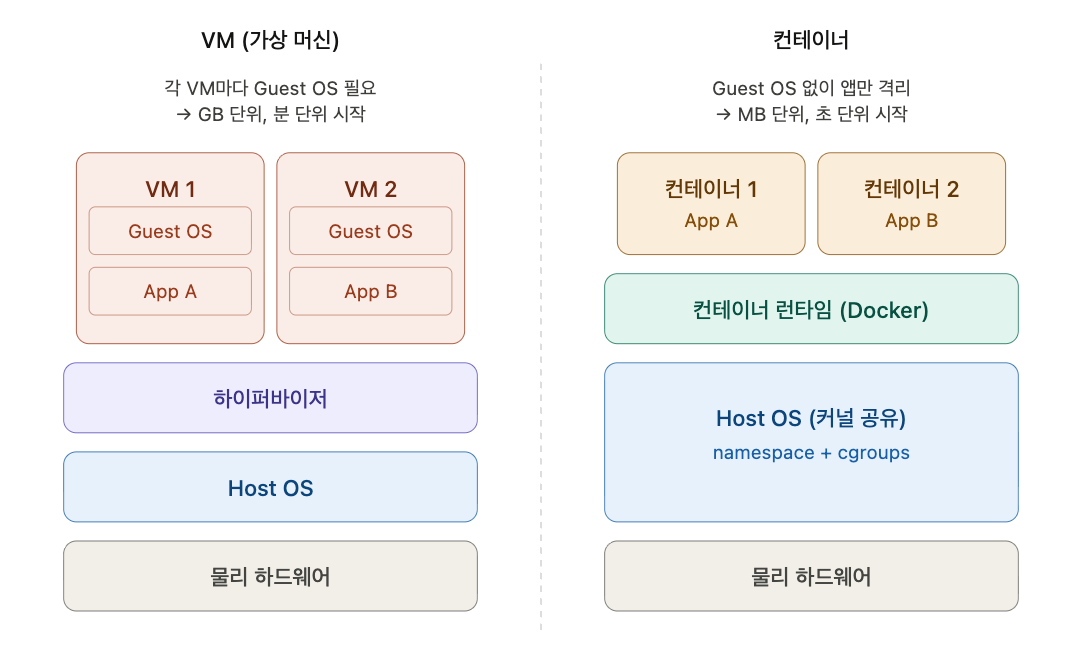
1. VM vs Container: Differences in Isolation Approach
| Category | VM (Virtual Machine) | Container |
|---|---|---|
| Isolation Level | Machine level (independent OS, independent kernel) | Process level (shares host OS kernel) |
| Architecture | Hypervisor → Guest OS → App | Host OS → Container Runtime → App |
| Size | GB scale (includes Guest OS) | MB scale (app + dependencies only) |
| Startup Time | Minutes | Seconds |
Key Difference: Containers can handle execution environments at the process level, keeping them small.
💡 Think of a VM as “renting an entire house” and a container as “using a single desk in a co-working space.” The building (kernel) is shared, but your space (namespace) is partitioned off, and your electricity and internet usage (cgroups) is limited.
Key Terms
- Hypervisor: Software that virtualizes physical server hardware resources (CPU, memory, disk) and distributes them across multiple VMs. (e.g., VMware ESXi, KVM, Hyper-V)
- Host OS: The operating system installed on the physical server
- Guest OS: The operating system installed inside a VM. This is the core reason VMs are heavyweight — a full Guest OS must be installed per VM.
💡 Example: Install Ubuntu on a physical server (Host OS), create 3 VMs with VMware, and install CentOS, Windows, and Ubuntu on each → you get 1 Host OS (Ubuntu) and 3 Guest OSes (CentOS, Windows, Ubuntu). Containers, by contrast, don’t need a Guest OS at all.
2. Core Linux Technologies That Enable Container Isolation
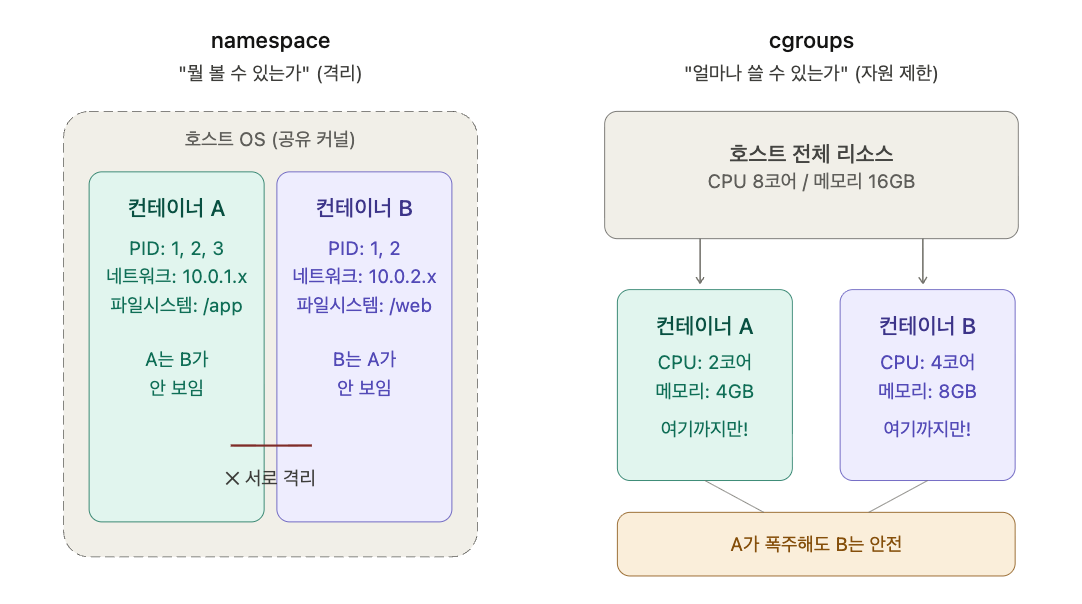
| Technology | Role | Analogy |
|---|---|---|
| namespace | Isolates what each container can see (PID, network, filesystem, etc.) | ”What can you see?” (isolation) |
| cgroups (Control Groups) | Limits resource usage per container — CPU, memory, disk I/O, etc. | ”How much can you use?” (resource limiting) |
In Kubernetes, the
resources.limits/requestssettings on a Pod work internally through cgroups. 💡 If you mix up namespace and cgroups, remember: namespace is a blindfold (hides other containers from view), cgroups is the size of your food bowl (limits how much you can consume). Without both, a container is no different from a regular process.
3. What Is a Process?
- Program: A chunk of code stored on disk (static, pre-execution state)
- Process: A program that has been executed and loaded into memory
When a process is created, the OS allocates:
- A unique PID (Process ID)
- An independent memory space (code, data, stack, heap)
- CPU time (distributed by the scheduler)
- Resources such as open files and network sockets
Analogy: A program is a recipe, a process is the act of actually cooking. Cook from the same recipe twice and you have two processes. Every line you see when you run
ps auxis a process.
4. 1 Container = 1 Process (One Concern per Container)
Why Should Each Container Have Only One Concern?
| Reason | Explanation |
|---|---|
| Lifecycle Management | When the PID 1 process exits, the container runtime terminates the entire container → unrelated services are also affected |
| Scaling | Each service can be scaled independently (e.g., scale only the web server with HPA) |
| Logging/Monitoring | stdout/stderr logs don’t get mixed, keeping debugging clean |
| Fault Isolation | A failure in one service doesn’t impact other services |
PID 1 and the Container Termination Mechanism
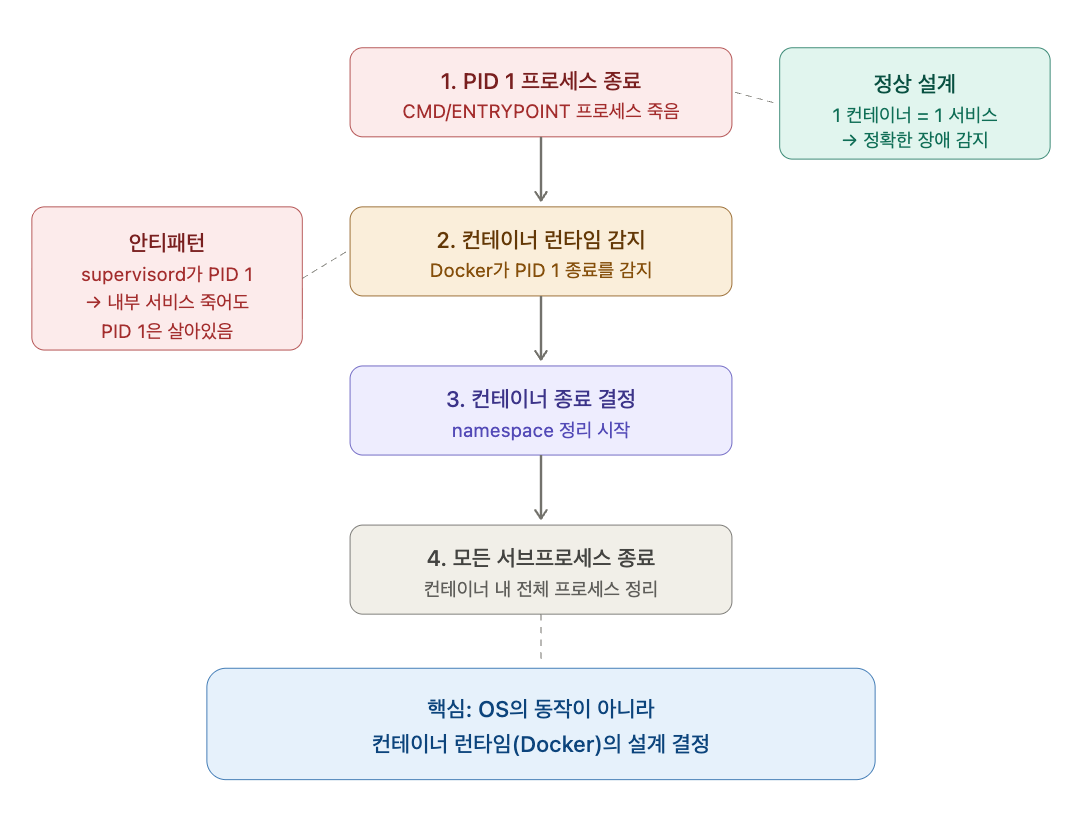
- PID 1 process exits
- Container runtime detects it → decides to terminate the container
- Container’s namespace is cleaned up → remaining processes are also terminated
On a normal Linux system, child processes can survive as orphans even after the main process dies. But in a container, the runtime interprets the exit of PID 1 as the signal to terminate the entire container. The key point is that this is a design decision of the container runtime (Docker), not OS behavior.
”Can’t We Just Run sleep as PID 1 and Spin Up Multiple Subprocesses?”
This exact idea is what led to the creation of supervisord. supervisord is a process manager program written in Python that can run, monitor, and restart multiple processes simultaneously. It’s a useful tool on traditional Linux servers, but running it as PID 1 inside a container to manage multiple services is a well-known anti-pattern.
Why Is It an Anti-Pattern? — It Violates Container Design Principles
Docker’s official documentation explicitly states: “Each container should have only one concern.” This is the container equivalent of the Single Responsibility Principle (SRP) from object-oriented design — the Single Concern Principle. Just as a class should have only one reason to change, a container should handle only one concern. The Twelve-Factor App methodology’s 6th principle also states that “processes should be stateless and share-nothing.”
Specific reasons why the supervisord approach violates these principles:
- Kubernetes goes blind. When supervisord (PID 1) is alive but the internal web server has died, Kubernetes thinks “this Pod is healthy.” You can work around it with liveness probes, but that’s adding unnecessary complexity.
- Independent scaling is impossible. When web server traffic spikes, the DB gets replicated along with it. Wasteful.
- Logs become a mess. When multiple service logs are mixed in stdout, tracing the cause of an incident becomes a nightmare.
- Deployments are all-or-nothing. Even if you only want to update the web server, you have to rebuild the entire image.
⚠️ Exception: When migrating legacy apps to containers during a transitional period, using supervisord may be unavoidable. But that’s “unavoidable,” not “recommended.” The end goal is always to separate services. 💡 One-liner: You can do it, but the more you do, the more pointless it becomes to use containers. At that point, you might as well just use a VM. 🎯 Interview tip: Saying “1 process” sounds junior. Saying “One concern per container” signals that you understand the underlying principle.
5. Characteristics of Container Technology
| Characteristic | Description |
|---|---|
| Lightweight Runtime | No Guest OS — just app + dependencies, MB-sized, starts in seconds |
| High Portability | Execution environment is fully packaged in the image → solves the “It works on my machine” problem |
| Vast Ecosystem | Docker Hub, Kubernetes, ArgoCD, Harbor, Jenkins, and more |
💡 “It works on my machine” — the developer’s most common excuse, and the biggest problem containers solved. An image that runs on your local machine will run the same way on a server, a colleague’s PC, or on AWS.
6. Container Images
- A filesystem composed of multiple layers
- Docker’s core philosophy: Build, Ship, Run
- Build: Build the image
- Ship: Distribute it through a registry
- Run: Run it anywhere
The details of the layer structure will be covered in the Docker section.
Comprehension Check Questions
Q1. You run ps aux inside Container A and see 5 processes with PIDs 1–5. But when you run ps aux inside Container B on the same host, none of Container A’s processes appear. What Linux technology enables this isolation? And what technology ensures that Container B remains unaffected even if Container A consumes 100% CPU?
Q2. A team is running nginx and a Flask app bundled together in a single container using supervisord. The Flask app dies, but the Kubernetes dashboard shows the Pod as “Running.” Explain why this happens by connecting it to how PID 1 works.
Q3. A colleague says, “Containers are just lightweight VMs.” Explain why this statement is inaccurate by contrasting the isolation approaches of VMs and containers.
Review Points
Q2: It’s “scaling,” not “scheduling.” Mixing these two terms in an interview is a red flag.
Q3: Add one key punch — you need to clearly land the conclusion: “They’re not a lighter version of the same technology — they’re a completely different approach.”